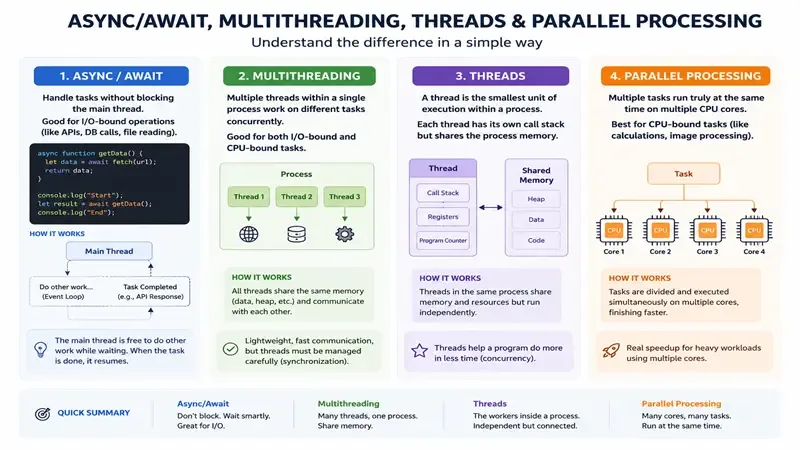
The Trick That Makes Applications Scale
- I/O-bound operations (API Call, DB Call or Read file) use async/await
- CPU-bound operations (For loops or process file) use parallel processing ex: Parallel.ForEachAsync (.NET)
Now understanding the trick
I/O Operations: Use Async/Await
For I/O operations such as API calls, database queries, or file access, use async/await.
These operations spend most of their time waiting for external systems. Async programming allows the thread to return to the thread pool while the I/O operation is in progress.
This prevents threads from being blocked and allows the system to process more requests concurrently.
CPU Intensive Work: Use Parallel Processing
For CPU-heavy tasks, such as large data processing or complex calculations, parallel processing can improve performance.
In .NET, a common example is:
Parallel.ForEach(items, item =>
{
    Process(item);
});
This distributes work across multiple CPU cores, allowing tasks to execute simultaneously.
Before using parallelism, it's important to verify that your server actually has multiple CPU cores available.
Prefer Task Over Creating Threads
In modern .NET applications, developers rarely create threads manually. Instead, they use Task, which is a higher-level abstraction that integrates with the Thread Pool.
Tasks provide better resource management and work naturally with async and parallel programming patterns.
Understanding Threads
What Is a Thread?
A thread is the smallest unit of execution inside a process.
It represents a sequence of instructions that the CPU executes. Threads allow programs to perform multiple tasks concurrently.
Hardware Threads (CPU Threads)
A CPU thread is a hardware execution unit inside the processor capable of executing an instruction stream.
Modern CPUs include:
- Multiple cores
- Multiple hardware threads per core (for example using Hyper-Threading)
Example:
- 4 cores
- 8 hardware threads
This means the CPU can execute up to 8 instruction streams concurrently, depending on workload and scheduling.
Threads in Programming
In programming, a thread is a software abstraction that represents a sequence of instructions we want to execute independently.
When a thread is created in code, the program requests the operating system scheduler to allocate CPU time for that thread.
Example in C#:
new Thread(() =>
{
    Console.WriteLine("Hello world");
}).Start();

new Thread(() =>
{
    Console.WriteLine("Hello world");
}).Start();
These threads may run concurrently depending on how the operating system schedules them.
Threads at the Operating System Level
At the operating system level, a thread is still the smallest unit of execution within a process.
The operating system is responsible for:
- Scheduling threads
- Assigning them to CPU hardware threads
- Managing execution
- Performing context switching
Thread Memory Model
Each thread contains its own:
- Stack – used for local variables and method calls
- CPU registers – temporary storage during execution
- Instruction pointer – indicates the next instruction to execute
- Execution state – running, waiting, or blocked
However, threads inside the same process share the same memory space.
This shared memory allows threads to collaborate, but it can also introduce concurrency problems such as race conditions.
Key Takeaway
High-performance applications scale by using the correct strategy for each type of workload:
- Async/await for I/O-bound operations
- Parallel processing for CPU-bound workloads
- Task and the Thread Pool instead of manually managing threads
Understanding these concepts is essential for don't rely entirely in expensive cloud horizontal and vertical scale.

Comments (1)
Leave a Comment
I found it helpful that the distinction between os, cpu and coding threads