
Why Do Companies Choose Blazor for Their Projects?
With Blazor, especially when using component libraries such as Syncfusion, development becomes extremely fast and easy to maintain while keeping a very high level of quality.
With practically a Ctrl+C and Ctrl+V, you can drop in a full Kanban board and focus only on the input and output of your data in the @code section, instead of spending your time wiring events, UI logic and component lifecycles.
<SfKanban CssClass="kanban-overview" KeyField="Status" DataSource="@CardData" EnableTooltip="true">
    <KanbanColumns>
        <KanbanColumn HeaderText="To Do" KeyField="@(new List<string> { "Open" })" AllowToggle="true"></KanbanColumn>
        <KanbanColumn HeaderText="In Progress" KeyField="@(new List<string> { "In Progress" })" AllowToggle="true"></KanbanColumn>
        <KanbanColumn HeaderText="In Review" KeyField="@(new List<string> { "Review" })" AllowToggle="true"></KanbanColumn>
        <KanbanColumn HeaderText="Done" KeyField="@(new List<string> { "Close" })" AllowToggle="true"></KanbanColumn>
    </KanbanColumns>
    <KanbanCardSettings ContentField="Summary" HeaderField="Title" SelectionType="@SelectionType.Multiple"></KanbanCardSettings>
    <KanbanSwimlaneSettings KeyField="Assignee"></KanbanSwimlaneSettings>
</SfKanban>

@code {
    private List<KanbanDataModel> CardData = new KanbanDataModel().GetCardTasks();
}
This is the result:
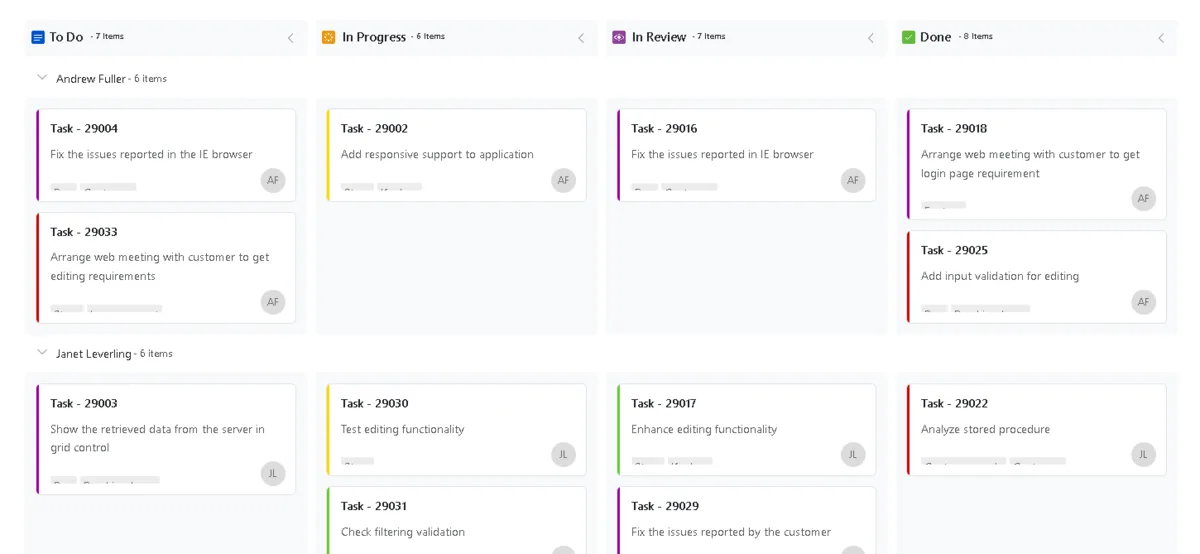
ℹ️Documentation and live demo: https://blazor.syncfusion.com/demos/kanban/overview?theme=bootstrap5
One note on licensing, because people always ask. Syncfusion and Telerik are commercial products, but Syncfusion has a Community License that covers a lot more people than they realise: companies and individuals with less than $1 million USD in annual gross revenue, five or fewer developers, and ten or fewer total employees. There is one extra clause worth knowing, which is that the organization must never have taken more than $3 million USD in outside capital such as private equity or venture capital. As an individual developer I fall well inside that, and so do most small shops and side projects. If you do not qualify, MudBlazor and Radzen are free alternatives that give you a lot of the same productivity.
🚀 A Unified Stack
Another major advantage is not having to constantly keep up with multiple technologies.
Instead of mastering a back-end stack and a completely different front-end stack, you use C# across the entire application. You reuse entities, validations, and business logic directly in the front-end, sharing code across layers. All of it from a single IDE.
Microsoft ships a new .NET version every year, in November, with a new C# version and a pile of features. Now imagine keeping up with all of that while also keeping up with a completely separate ecosystem like Angular, JavaScript, TypeScript and whatever build tooling is fashionable that year.
If you only have to care about Blazor, you can spend that time learning design patterns and architecture instead of chasing framework churn in two languages.
🧩 Less Complexity
Depending on the architecture you choose, you may not even need an API. With Blazor Server or SSR, you can inject services and repositories directly into the components. If you do need an API later, you create it as a separate project. That flexibility cuts a lot of initial complexity.
Worth noting: this only applies to the server-side render modes. Blazor WebAssembly runs in the browser, so it always needs an API to reach your data.
🌐 Integration with Visual Studio and Azure
The integration with Visual Studio and Azure is excellent. A few clicks to create a Blazor project from Microsoft's templates, a few more to publish it to Azure. For teams already on .NET, this cuts setup and deployment time dramatically.
📚 The Same .NET Ecosystem
The same packages you already use on the back-end often work on the front-end too. Everything goes through NuGet. Fewer technologies for the team to learn and support.
💡Benefit: Back-end developers can build modern front-end applications with a very low learning curve, using component libraries to create dashboards, grids, charts, and complex interfaces without becoming experts in JavaScript frameworks.
🖥️ MAUI Blazor Hybrid
There is a Visual Studio template called MAUI Blazor Hybrid. With it you reuse both your back-end and your front-end code and ship to:
- Web
- Windows
- macOS
- Android
- iOS
Virtually the same codebase, the same IDE, the same technologies. From a productivity standpoint it is hard to find anything comparable inside the Microsoft ecosystem.
👥 More Flexible Teams
There is an organizational benefit too. When someone goes on vacation or takes leave, another developer picks up the work with much less friction. The whole application lives in one ecosystem, so knowledge transfer is far easier.
🔄 Continuous Platform Evolution
Choosing Blazor means investing in a platform Microsoft actively supports. A good example is Render Modes, introduced in .NET 8. With them you decide, per component, whether it runs on the server or on the client. That single feature is what makes the architectures I describe later in this article possible.
⚡ A Concise List of Blazor Advantages
- ✅ Full-stack development using only C#.
- ✅ Reuse of entities, validations, and business rules between back-end and front-end, including across multiple platforms.
- ✅ Less code duplication and higher productivity.
- ✅ Rapid UI development using component libraries such as Syncfusion, Telerik, MudBlazor or Radzen.
- ✅ Native integration with Visual Studio, Identity, Dependency Injection, and the rest of the .NET ecosystem.
- ✅ Simplified deployment to Azure.
- ✅ Automatic CRUD generation through scaffolding.
- ✅ Blazor WebAssembly supports offline use.
- ✅ Render Modes let you mix SSR, Server and Client rendering in the same app.
⚠️ So Why Do Some Companies Fail with Blazor?
I have personally seen companies abandon Blazor. I also have friends at large corporations, including in the automotive industry, who moved away from it because of performance.
Last year, when my client assignment ended, I went through several interviews, internal and external. What struck me was that the main reason people wanted to talk to me was five years of real production Blazor and exposure to architectures built by different engineers. That combination is rare, and it is why I know exactly where teams go wrong.
The usual explanation you hear is "Blazor Server holds a SignalR WebSocket per user, so it does not scale". That is not wrong exactly, but it is the wrong level of abstraction, and it leads teams to the wrong fix. Let me start with the thing almost nobody defines.
First, What Is a Circuit?
A circuit is the server-side representation of one live Blazor session. When a user opens an interactive page, the server creates a circuit and keeps it in memory for as long as that page stays open. Inside it lives:
- The rendered component tree, meaning the hierarchy of component instances and their most recent render output
- The value of every field and property inside those component instances
- Every DI service scoped to that circuit
- The state needed for JavaScript interop
Two details people get wrong here.
A circuit is per document, not per user. It corresponds to rendering a single document in the browser, so two tabs on your site is two circuits, two sets of state, two connections. The same person can cost you three times over.
A circuit lives for the session, not for the request. In MVC or Razor Pages, everything you allocate dies when the response is written. In a circuit it stays resident while the user has the tab open. That single difference is the source of almost every Blazor scaling problem I have seen.
It Is Not Blazor. It Is One Render Mode.
Here is the correction that matters most, and the one I wish somebody had handed me years ago.
Circuits only exist in Interactive Server. A page rendered with Static SSR has no circuit and no WebSocket at all. It renders HTML, answers the request, and it is done. It is a Razor Page with component syntax.
So "Blazor keeps a SignalR connection open for every user" is not a property of Blazor. It is a property of one render mode. If a page has no server-interactive components, there is nothing open.
Even inside Interactive Server there is nuance: Blazor prerenders the page statically first, and only then does blazor.web.js boot the circuit. There is a window where the content is already delivered and no connection exists yet.
This is why "Blazor doesn't scale" is a category error. It is not a framework verdict. It is a render mode that somebody selected, usually without realising it was a choice at all.
What Actually Travels Over the Wire
People assume the circuit state is being pushed through the WebSocket. It is not, and understanding why explains the whole cost model. Here is a single interaction:
- You click. The browser sends a tiny message: a handler ID plus the event args. A few bytes.
- The server finds the component instance already in its memory, invokes the handler, and re-renders that component into a new render tree.
- The server diffs the new render tree against the previous one, which it kept.
- Only the diff goes back over the WebSocket. The browser patches the DOM.
So the state never leaves the server. What crosses the wire is a description of what changed on screen.
And that is exactly why the server has to keep the previous render tree in memory. You cannot compute "what changed" without holding on to "before". The memory cost is not an accident, it is the price of a tiny network payload. A deliberate trade-off in the design.
Two things do put real bytes on that connection though, and they are worth knowing:
- JavaScript interop serialises data in both directions. If a component pushes a dataset into Chart.js through interop, that is a real payload, not a small diff.
- Navigation between pages runs through the circuit rather than doing a page load, so routing traffic lives on the socket too.
One more thing: the WebSocket is preferred, not guaranteed. SignalR negotiates its transport, and Blazor works best over WebSockets because of lower latency and better reliability. But corporate proxies block them often enough, and then you fall back to Long Polling or Server-Sent Events. With long polling, every event becomes a fresh HTTP request with all the header overhead, and latency climbs. The circuit is unchanged, the transport just got expensive. If you ship to enterprise clients, plan for this.
The Real Cost Model: Per Session, Not Per Request
Now the part that actually matters. Forget arguing about whether WebSockets are expensive. The right question is what unit you are billed in.
In HTTP your cost is proportional to requests in flight. In Interactive Server your cost is proportional to sessions present.
A thousand people reading a Razor Page might mean twenty concurrent requests. The other 980 are sitting there reading and they cost you nothing. In Interactive Server, those same 980 people are holding 980 circuits and 980 connections. An idle user is not free. They are not even silent: there is a periodic keepalive between server and client, so the person who opened a tab and went to lunch is still generating traffic and keeping everything alive.
That per-session cost has two components, and it is worth being precise about both instead of picking a winner.
The circuit. Microsoft puts it at roughly 250 KB for a minimal Hello World app, and recommends budgeting at least 1.3 GB for 5,000 concurrent users, around 273 KB per user. Their sizing formula is as blunt as it gets:
Maximum Available Memory / Per-circuit Memory = Maximum Potential Active Circuits
And 250 KB is the floor, not your number. If you hold a List<Order> of 5,000 rows in a component field for a grid, that list is per circuit, resident, for the whole session. Now you are at several MB per user, not 273 KB.
The connection. Microsoft's own SignalR scaling guidance is blunt about this too. Standard HTTP clients use ephemeral connections that close when the client goes idle, while a SignalR connection is persistent and stays open even when the client does nothing. In a high-traffic app serving many clients, those persistent connections can push a server to its maximum connection count, and they consume extra memory to track each one. There is a nastier consequence as well: when SignalR takes the last available TCP connections, other apps hosted on the same server have none left, and you start seeing random socket errors and connection resets.
So which one takes you down depends entirely on the scenario, and I want to be honest about that rather than crown a single villain:
- Internal dashboards, authenticated users, long sessions: the circuit dominates by a wide margin. This is where nearly everyone misdiagnoses the problem, blames the WebSocket, and rewrites in React for nothing.
- Public, high-traffic pages: both bite, and the connection ceiling often hits first. The symptom is socket errors, not out-of-memory, so you stare at a healthy RAM graph while the site falls over.
In neither case is the answer a bigger server. The answer is not putting circuits where they do not belong.
Public Pages Are the Worst Case
Public traffic breaks the Interactive Server model in ways that are easy to miss until you are live:
- Bots and crawlers open circuits like anybody else. Google, Bing, scrapers, uptime monitors. None of them will ever click a button. All of them cost you.
- Bounce traffic is brutal. Someone arrives from search, reads for three seconds, closes the tab. That circuit sits in the disconnected pool for three minutes by default. Your concurrent connection count is much higher than your concurrent audience.
- Spikes become connection storms, not request queues. In HTTP a burst drains. In Interactive Server everyone arrives and stays.
- PaaS tiers cap concurrent WebSockets. Azure App Service has per-tier limits, and on the lower tiers the number is smaller than people expect. Check the current table before sizing.
This is the single biggest architectural mistake I see: putting Interactive Server on the public surface of a site because it was the default in the template.
Three Mistakes I Keep Seeing
These are the ones I have watched architects and senior engineers with decades of experience walk straight into. People who came from Angular or React, assumed Blazor worked the same way, and never opened a book about it.
1. Scoped is per circuit, not per request. This one kills projects. You register AddScoped<AppDbContext> the way you always did in MVC. There that context lives about 200 ms. In a circuit it lives for the entire session. The change tracker accumulates entities for hours, a pooled connection stays held, and EF Core is not thread-safe for the concurrent renders Blazor can trigger. Use AddDbContextFactory and create a context per operation.
2. Large collections held in component fields. Anything you assign to a field stays in memory for the session. Page your data instead of loading full result sets, use virtualization, and clear collections in IDisposable when the component goes away.
3. Closing the tab does not free memory immediately. When a connection drops, Blazor moves a limited number of circuits into a disconnected pool so the client can reconnect, with a default retention of three minutes. Worse, a disconnected circuit can keep doing work and burning CPU and memory. Both are configurable through DisconnectedCircuitRetentionPeriod and MaxRetainedDisconnectedCircuits. Plenty of teams watch the memory graph refuse to come down after a spike and diagnose a leak that is not there.
Latency Bites You Before Load Does
There is a second failure mode with nothing to do with capacity. Every UI event is a round trip. A @bind on oninput sends a message per keystroke.
User in São Paulo, server in East US, 120 ms per keystroke. The UI feels broken with ten people online. This is what makes a developer conclude "Blazor is slow" without ever getting close to exhausting a resource. The fix is not a bigger server, it is moving that component to the client.
The Most Common Mistake
The developer sees the symptoms and concludes "Blazor doesn't scale". Then they abandon the technology and rewrite in a JavaScript framework, usually at enormous cost, when the actual fix was a render mode change and a DI registration.
The other common mistake is putting JavaScript developers on Blazor with no training. The syntax looks approachable enough that people skip the learning, but the good practices are completely different, and the ones that matter most are exactly the ones above.
How to Solve It
Once you understand that you are paying per session and not per request, the options are obvious:
- Render Modes. Choose per component where it runs. This is the highest leverage tool you have, and it is why .NET 8 changed the conversation.
- Static SSR for public pages that do not need interactivity. No circuit, no connection, no per-session cost.
- Blazor WebAssembly consuming APIs for interactive public features. The state moves to the user's browser, so it scales for free.
- Interactive Server for internal dashboards and admin areas with a known, bounded user count. This is where it genuinely shines and where the productivity is worth the cost.
- Hybrid architectures mixing all of the above in one application.
WebAssembly is not a free lunch either, and I want to be straight about that. You pay for the .NET runtime download on first visit, startup is slower, the payload is heavier, and debugging is worse. On a public page where first paint matters, that trade can hurt as much as the circuit did. Measure both.
⚠️Azure SignalR Service does not do what most people think. It moves connection management off your server, which genuinely helps with the connection half of the problem. But the circuit still lives in your app's memory. You offloaded the transport, not the state. Teams buy it expecting a complete scaling fix and end up disappointed, for exactly the reason this article is about.
💡 The Most Underrated Framework in the .NET Ecosystem
Now comes what I think is the most interesting part.
ASP.NET Razor Pages
Razor Pages is probably the most underrated framework in the .NET ecosystem. It gives you most of what attracts people to Blazor in the first place:
- C#
- .NET
- Razor syntax
- Shared code with the back-end
- Component libraries such as Syncfusion
But with far lower overhead for public, high-traffic pages, because there is no circuit and no persistent connection to maintain.
How It Works
Razor Pages is a native HTTP architecture. Each page has its own view and its own code-behind handling the request. Stateless, cacheable, and any instance can serve any user. For public pages taking heavy traffic it is extremely efficient, and it goes back to the model where an idle reader costs you nothing.
🌍 How This Website Was Built
The site you are reading right now uses exactly this hybrid approach. Public pages, the ones that take traffic from search and social, are Razor Pages. The dashboard uses Blazor Render Modes. Charts and heavier client-side features run in the browser. Administrative work like article management uses interactive server rendering, because it is a handful of authenticated users and the SPA-like experience is worth the circuit. And when I need a JavaScript library, I can still integrate it and sync it with C# without much effort.
That is the point. It was never Blazor or not Blazor. It is picking the right render mode for each part of the application.
ℹ️Worth mentioning: none of this involves Copilot, Claude Code or Codex. Long before AI agents existed, Blazor was already a productivity hack. We built entire portals in two weeks thanks to entity scaffolding. Create an entity with its properties, generate the Insert, Update, Delete and List pages, already with basic validations, ASP.NET Identity permissions and a responsive Bootstrap layout. After that we only had to add the business rules.
🏁 Wrapping Up
Blazor does not fail because it cannot scale. It fails because teams adopt it with a mental model borrowed from stateless web frameworks and never update it.
If you take one thing from this article, take this: scaling Blazor Server is not about scaling connections, it is about scaling state. Once that clicks, the decisions make themselves. Circuits for bounded, authenticated, interactive screens. Static SSR or Razor Pages for the public surface that takes real traffic. WebAssembly when you want interactivity without holding state on the server, and you are willing to pay the startup cost.
The teams I have seen give up on Blazor were not wrong about the symptoms. They were wrong about the cause, and it cost them a rewrite they never needed.
If you have hit any of this in production, I would like to hear about it in the comments. The failure cases are far more useful to write about than the happy path.

Comentários (0)
Deixe um Comentário
Seja o primeiro a comentar!